
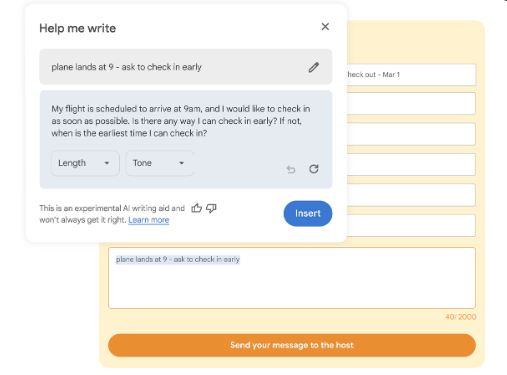
Google has a good news for the Chrome Browser users. The Mountain View Giant is launching a new AI feature in the Chrome Browser that will help you to compose written content, everything from classifieds to online reviews. Google has named it “Help Me Write” and it’s announced the previous month.
Now everyday writing will be made easy with the “Help Me Write” AI tool as it will generate content based on the context of the website you are browsing and the text that you want to write. For instance, if you want to sell an item online it can collect a brief from you to expand into a detailed, polished content.
Google makes this fact evident saying, “The tool will understand the context of the webpage you’re on to suggest relevant content. For example, if you’re writing a review for a pair of running shoes, Chrome will pull out key features from the product page that support your recommendation so it’s more valuable to potential shoppers.”
How to enable “Help Me Write” in Chrome
The process is easy. to activate “Help Me Write,” the Google Chrome users need to navigate to the “Experimental AI” section in the Browser Settings. This feature has been added to the latest Chrome M122 OS and hence users must upgrade their system to the latest Chrome OS. The feature can be turned off at anytime you want.
At this moment, the AI tool is available only for the English-language users in the United States on Mac and Windows PCs. It may be rolled to the other parts of the globe soon.