
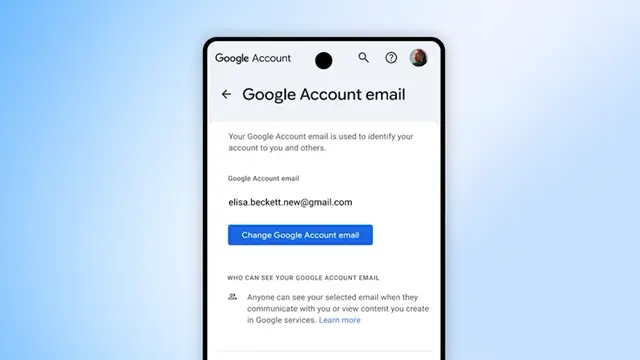
Embarrassing names in your Google Account username can not only lower your confidence but can also make you a laughing stock in many official and personal situations. Hence to save you from the embarrassment Google now allows you to change your username that is the part before @gmail.com. Google has shared an official update in this regard and said, “Your digital identity just got an upgrade. You can now change your Google Account username (i.e., the part before @gmail.com), which you use to sign in to apps and services like Gmail, Photos, Drive and more.” Google further adds, “We started rolling this out last year to help your account grow with you.”
However it is worth mentioning here that, for now the feature has been made available for users in United States of America only. Google says, “The ability to change a username is available now for all Google Account users in the U.S.” Google also informs, “The ability to change your Google Account email is gradually rolling out to all users and this option may not be available to you yet.”
Your Google Account username
Your Google Account username is what you use to sign into Google products and services. When you’re signed in, this google Account username shows up for you next to your name and profile photo.
To find your username, select your Profile picture or initial at the top right of any Google service. Your Google Account username is where you get important information about most Google services you use, unless you’ve added a different contact email. Your Google Account username will also be visible when you do things like share Drive files, send Calendar invites, or use Sign in with Google.
Changing your Google Account email
When you change your Google Account username from one that ends in gmail.com to a new address that ends in gmail.com: Your previous Google Account email ending in gmail.com will become an alternate email address. Learn more about alternate emails. You will receive emails to both your old and new addresses.
The data saved in your account won’t be affected. This includes things like photos, messages and emails sent to your previous email address. You can change back to your previous email address at any time, but you can’t create a new Google Account email ending in gmail.com for the next 12 months. You also can’t delete your new email address. You can sign in with your old or new email address on Google services, such as Gmail, Maps, YouTube, Google Play or Drive.
Smarter Gmail
In addition to the Google Account username, your regular Gmail is now becoming smarter in 2026, as Gmail is now entering the Gemini era. So what is this what all will change in Gmail. Lets take a look. To help, mange your mails, Google is taking the Gmail into the Gemini era and making it your personal, proactive inbox assistant. The tech giant says, “today, 3 billion users rely on Gmail to connect and get things done.”
You can now ask your inbox: this means that when you ask your inbox a question, it uses Gemini to generate a simple AI Overview with the answer. Further, instead of hunting for keywords or digging through a year of emails, just use natural language and you will get what you are searching for instantly. AI Overview conversation summaries have been rolled out for everyone at no cost. The ability to ask your inbox questions with AI Overviews is available to Google AI Pro and Ultra subscribers.
Gmail can now help you write: you can now use Help Me Write to polish emails or draft them from scratch. There are also new Suggested Replies which is an update to the Smart Replies. It uses the context of your conversation to offer relevant, one-click responses that match how you write. Suggested Replies can instantly draft an initial response in your tone and style, leaving you free to refine it before giving it your approval.
In addition to this, you can also use the new Proofread feature for advanced grammar, tone and style checks so everything is polished before you send.
The AI Inbox: The new AI Inbox filters out the clutter so you can focus on what’s most important. The AI Inbox is like having a personalized briefing, highlighting to-dos and catching you up on what matters.
It helps you prioritize, identifying your VIPs based on signals like people you email frequently, those in your contacts list and relationships it can infer from message content. Crucially, this analysis happens securely with the privacy protections you expect from Google, keeping your data under your control.