
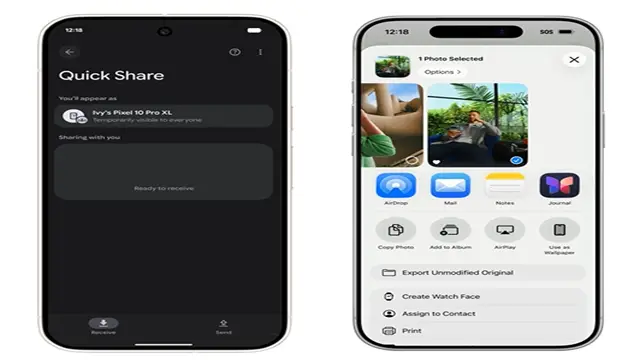
Android and iPhone users can now share files with the AirDrop feature. The feature will first be available on the Pixel 10 family and then later be rolled out for all the other Android devices.
Google says, “When it comes to sharing moments between family and friends, what device you have shouldn’t matter, the sharing should just work. But Google has heard from many people that they want a simpler way to share files between devices.
This has made the Company introduce a way for Quick Share to work with AirDrop. This makes file transfer easier between iPhones and Android devices. This was a much awaited feature for both Android and iPhone users.
At a recent press briefing, Google’s VP of Engineering for Android, Eric Kay, confirmed that Quick Share’s AirDrop will expand to more Android devices soon. Kay hinted at better tools designed to make switching from iOS to Android easier, including seamless data transfers between devices.
What Is AirDrop How Does It Work
AirDrop uses a combination of Bluetooth and Wi-Fi Direct to create a peer-to-peer connection between devices. Here’s how it works behind the scenes:
- Bluetooth scans for nearby Apple and (now) Android devices that have AirDrop enabled.
- Once a device is detected, Wi-Fi Direct takes over to transfer data quickly, even without an active internet connection.
Security Concerns About Airdrop On Android
Google has built this with security at its core, protecting your data with strong safeguards that were tested by independent security experts. It is just one more way Google is bringing better compatibility that people are asking for between operating systems, following Google’s work on RCS and unknown tracker alerts.
Google adds that, ” We’re looking forward to improving the experience and expanding it to more Android devices.”
iOS 26.3 Also Has The Airdrop On Android
Apple is urging all its users to regularly update their iPhones so that the security and other features function smoothly. The update is already available to users in its beta version. Apple in the update on iOS 26.3 beta says, “gives you an early preview of upcoming apps, features, and technologies. Please back up your iPhone before you install the beta.” Apple just made it simpler to move from iPhone to Android with iOS 26.3 beta.
So according to the update by Apple on the iOS 26.3 release, the main highlight is the shifting of data from an android to an iPhone shall become very easy and convenient.
Apple in the iOS 26.3 beta update adds a new feature called Transfer to Android that makes it easier to migrate from an iPhone to Android device without the need of third-party apps. We’re expecting iOS 26.3 software to come out somewhere around the end of January.
“Place your Android device next to this iPhone to get connected and begin the transfer process,” Apple explains in the Settings app. “Notification Forwarding” system that allows iPhone notifications to show up on a third-party smartwatch or other wearable form factor.
“Notifications can be forwarded to one accessory at a time,” Apple explains. “Notifications will not appear on Apple Watch while Notification Forwarding is turned on.” You can find this new option in the “Notifications” menu in the Settings app. The feature, however, is limited to the European Union.